Found under Reports > Agents Downloads. This report identifies agents who have bills waiting to be downloaded — useful for following up before a document goes stale, or before a customer chases a bill their agent hasn't actioned yet.
An "agent" here is a third party managing documents or Subscriptions on behalf of the actual customer — for example, a property manager receiving bills for properties they manage. See Group (agent) Subscriptions and Agent Authorisations for how agent access is set up.
Run the report
- Open Reports > Agents Downloads.
- Review From bill due date and To bill due date, and adjust the period if needed.
- Select Generate Report.
Report columns
One row per agent:
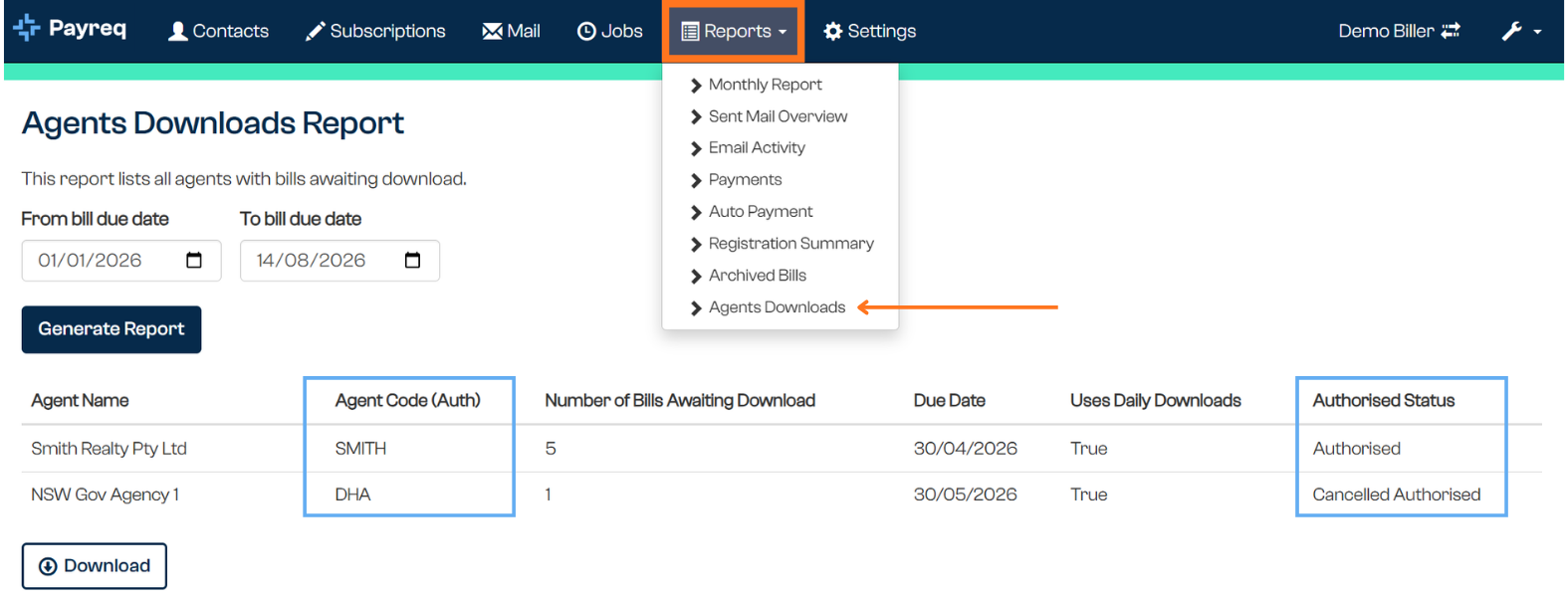
| Column | What it shows |
|---|---|
| Agent Name | The agent's organisation or account name |
| Agent Code (Auth) | The agent's authorisation code |
| Number of Bills Awaiting Download | How many bills are currently sitting undownloaded for that agent |
| Due Date | The due date associated with the bills awaiting download |
| Uses Daily Downloads | Whether the agent has daily downloads enabled (True/False) |
| Authorised Status | The agent's authorisation state, as a numeric code in the CSV export (the console itself shows the written status instead — see below) |
Authorised Status codes:
| Code | Status |
|---|---|
| 1 | Authorised |
| 2 | Cancelled |
| 3 | Pending |
The CSV export shows these as numbers; the report as displayed in the console shows the plain-English status instead.
Related articles
Was this article helpful?
That’s Great!
Thank you for your feedback
Sorry! We couldn't be helpful
Thank you for your feedback
Feedback sent
We appreciate your effort and will try to fix the article