The Archive feature lets you save documents to Payreq that weren't sent through Payreq at all — for example, something you printed and posted yourself outside the platform. Archiving keeps a digital copy available, so if the customer later registers for digital delivery, they can see their past documents without you having to send them again.
How an archived document becomes visible
- You upload and approve a document as an archive item (approval, not upload, is what triggers processing).
- If the customer doesn't yet have an active Subscription, the document sits in your Mail Archive.
- If a customer later creates a registration and History is enabled for your account, the archived document becomes visible in their Mailbox — without you having to resend it.
- In your Mail view, this shows as a Sent item, with the channel "Payreq (via archive)" on the Billing Detail Report (see Understanding Monthly Reports). In the Mail item's own details, the recipient Channel shows as "MyBills (via archive)".
The Archived Bills report
Found under Reports > Archived Bills. Confirmed via a real export from the test environment — one row per Biller, for the selected period:
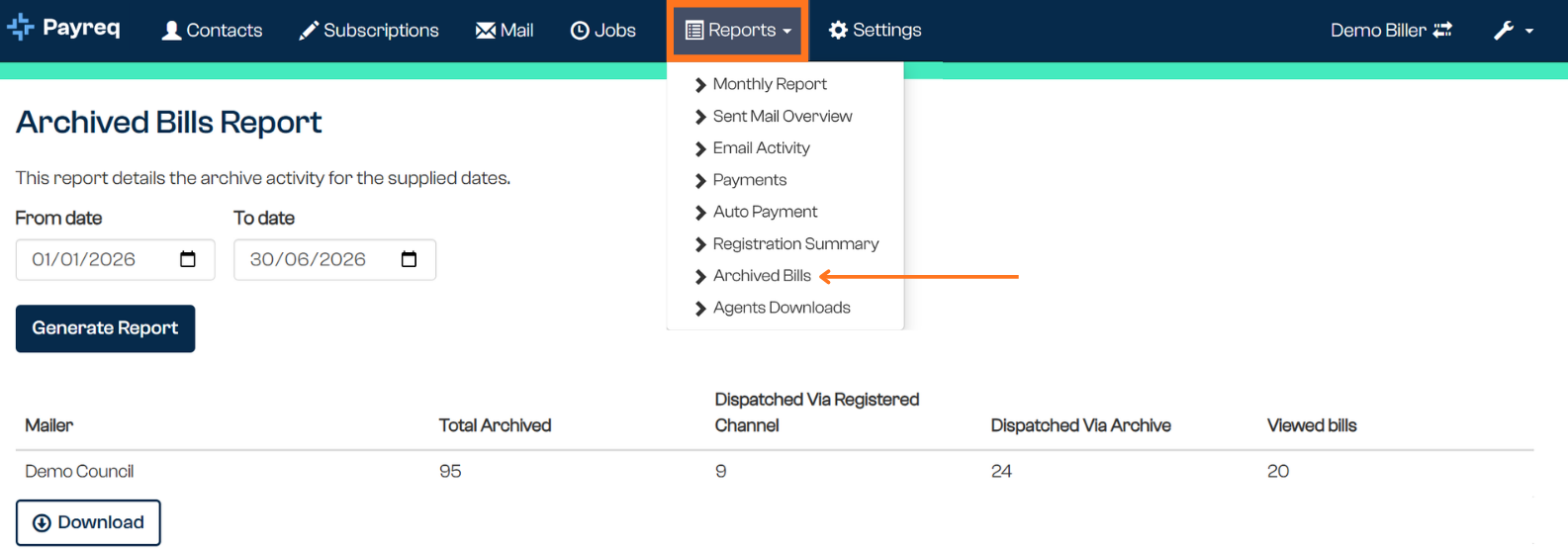
| Column | What it shows |
|---|---|
| Mailer | The organisation the archive activity belongs to |
| Total Archived | The total number of items submitted for archiving in the period, based on the date they were submitted (not the date they were approved) |
| Dispatched Via Registered Channel | Of the items submitted, how many were sent immediately as normal Mail because the customer already had an active registration at the time, rather than being archived |
| Dispatched Via Archive | How many previously archived items became visible to a customer during the period, because they registered or activated History access. These show as Sent in your Mail view |
| Viewed bills | How many archive-delivered items were opened by the customer for the first time during the period. Independent of the other three columns — a document archived long ago could be viewed for the first time in this period even if none of the other figures moved |
Note that Dispatched Via Registered Channel, Dispatched Via Archive, and Viewed bills can be blank rather than zero where there's no activity to report, as seen in the example export.
This report doesn't show up for every account. It didn't appear in the Reports menu for at least one live mailer account checked. This is most likely because it only shows when Archive is enabled for that account, but that's not confirmed — if you go looking for it and it isn't in your Reports menu, that's the probable reason rather than a fault.
Why the numbers might not move the way you expect
Because Archive spans two events — the original archiving and, potentially much later, a customer registering and viewing the document — the same archived item can show up differently depending on which reporting period you're looking at and which column you're reading. A document archived last year could still show up in this month's Dispatched Via Archive or Viewed bills figures if that's when the customer first saw it.
This also means the Total Archived figure for a past period won't change later, but Dispatched Via Archive and Viewed bills figures reflect activity that can happen well after the original archive date.
Related articles
Was this article helpful?
That’s Great!
Thank you for your feedback
Sorry! We couldn't be helpful
Thank you for your feedback
Feedback sent
We appreciate your effort and will try to fix the article