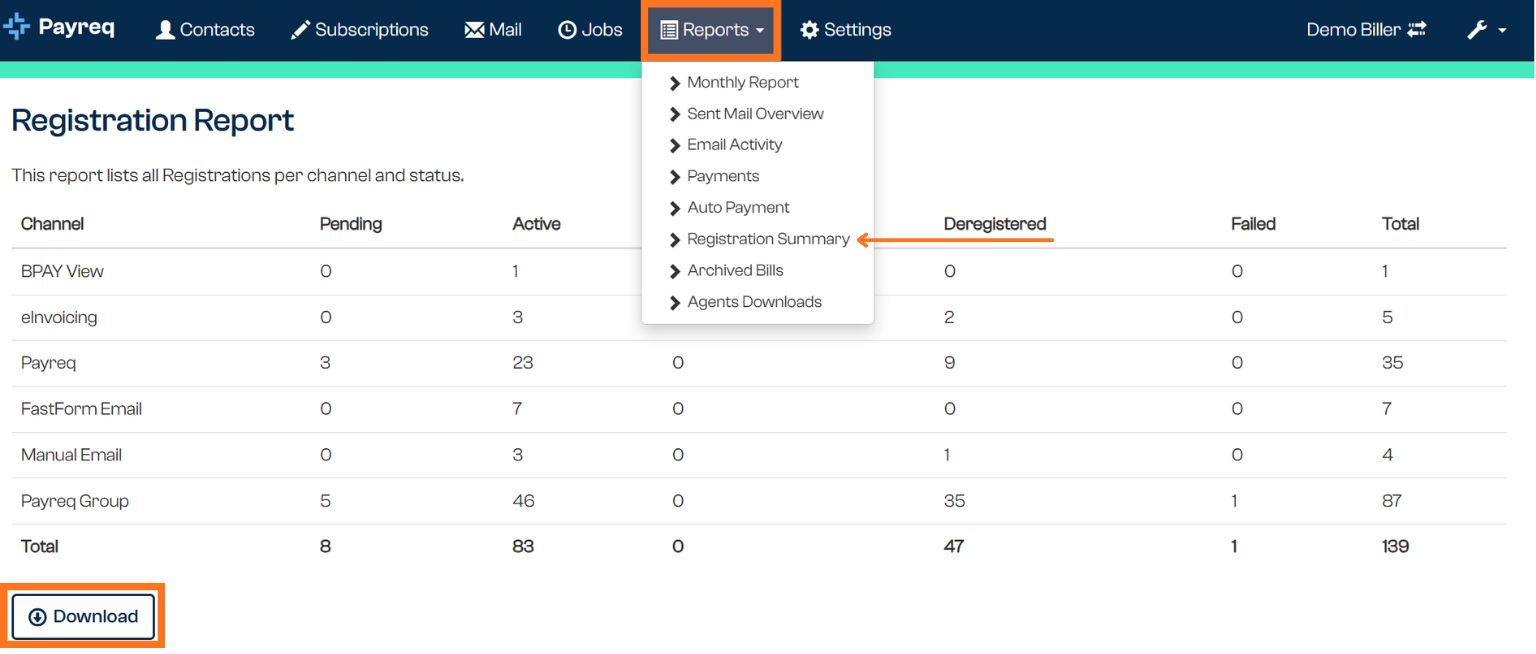
Found under Reports > Registration Summary. This report breaks your Subscriptions down by channel and status, giving you an account-level count rather than a per-customer view — useful for monitoring digital take-up, spotting changes over time, or exporting active or inactive lists without pulling and counting a raw Subscriptions export yourself.
Report columns
Confirmed via a real test-environment export — one row per channel:
| Column | What it shows |
|---|---|
| Channel | The delivery channel (e.g. BPAY View, Payreq, FastForm Email, Manual Email, Payreq Group, eInvoicing) |
| Pending | Subscriptions awaiting approval or processing for that channel |
| Active | Currently active Subscriptions for that channel |
| Deregister ? | Subscriptions flagged for review before deregistering — see Managing "Deregister?" Subscriptions |
| Deregistered | Subscriptions that have been deregistered for that channel |
| Failed | Subscriptions that failed for that channel — see Reviewing pending failed Subscriptions |
| Total | Sum of all statuses for that channel |
These statuses match the ones you'll already recognise from the Subscriptions page itself — this report is the same status set, aggregated by channel instead of shown per customer. See Navigating the Subscriptions page: overview and statuses for what each status means at the individual-Subscription level.
Why this is useful
The number of active Subscriptions doesn't always match the number of digitally registered accounts, because one account can hold more than one active Subscription across different channels (for example, both an email Subscription and a BPAY View Subscription). Registration Summary is the way to see that breakdown by channel at a glance, rather than working it out from a raw Subscriptions export. See Downloading Subscriptions.
Related articles
Was this article helpful?
That’s Great!
Thank you for your feedback
Sorry! We couldn't be helpful
Thank you for your feedback
Feedback sent
We appreciate your effort and will try to fix the article