Every Mail item has a status that shows where it sits in the delivery process, and whether any action is needed. Here's what each status means.
TABLE OF CONTENTS
- Queued
- Sent
- Pending Subscription
- Contact Changed
- Awaiting Credits
- Awaiting Review
- Error
- Undeliverable
- Undeliverable Actioned
- Archived
| Status | What it means | Action needed? |
|---|---|---|
| Queued | The document has been approved for send, either because it passed Awaiting Review and was approved, or automatically when Review Mail Before Sending isn't enabled. | No. |
| Sent | The document was successfully delivered. | No. |
| Pending Subscription | The customer hasn't completed their Subscription yet, so the document is held. | Sometimes, prompt the customer or check the details. |
| Contact Changed | A Contact change has flagged a related Subscription for review, so the document is held until that Subscription is actioned. | Yes, review the flagged Deregister? Subscription. |
| Awaiting Credits | The customer account has run out of credits, so the document is held. Credits are shared across customer accounts. | Yes, add credits. Held documents then dispatch automatically. |
| Awaiting Review | The document needs your approval before it's sent (if this step is enabled). | Yes, approve or reject it. |
| Error | The document never reached a deliverable state, for a reason unrelated to a delivery channel. | Yes, review and resolve it. |
| Undeliverable | Delivery failed on at least one channel. The document may still have been delivered on others. | Yes, review and action it. |
| Undeliverable Actioned | An undeliverable item has been reviewed and handled externally. | No. |
| Archived | The document was sent when there was no active Subscription, and is stored for later. | No. |
Queued
The document has been approved for send. If Review Mail Before Sending is enabled, an item reaches Queued once it has passed Awaiting Review and been approved. If that option isn't enabled, the document is queued automatically. Queued is a normal, short-lived status on the way to Sent. No action is needed.
Sent
The item was successfully processed and delivered to the registered customer. Open a Sent item to see when it was sent, which channels were used, and whether the customer has viewed it. If a document went to multiple subscriptions and one failed, that shows in the detail view under No. Failed Payers. When that count is zero, the document was delivered through every active Subscription. No action is needed.
Pending Subscription
The document is ready to send, but the customer's Subscription hasn't been confirmed or activated yet. This can happen when the customer began registering but hasn't verified their details, or when their details didn't match exactly. The document is held until the Subscription completes or times out. You may need to prompt the customer to finish registering, or investigate the mismatch.
Contact Changed
A Contact change has been identified that affects a Subscription linked to this document, so the document is held until that Subscription is reviewed. This most often happens when a Contact's name changes and Payreq flags the related Subscription Deregister? for review. See Managing "Deregister?" Subscriptions and How Contact changes affect Subscriptions. Once the flagged Subscription has been reviewed and actioned, the document proceeds normally.
Awaiting Credits
The customer account has run out of credits, so the document is held. Credits are shared across customer accounts rather than held separately for each one, so a shortfall isn't specific to a single customer. Add credits to the customer account to resume sending. Once credits are available, Awaiting Credits documents dispatch automatically; no further action is needed to release them. The exact steps to add credit depend on your account; check your Settings area or contact your Payreq representative if you're not sure where to do this.
Awaiting Review
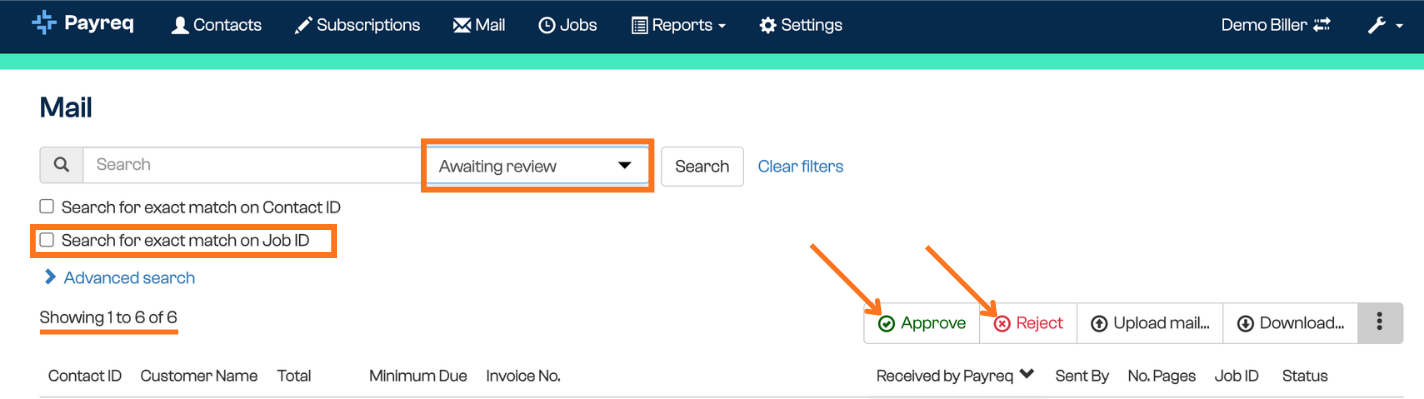
If the Review Mail Before Sending Mailer Option is enabled, newly uploaded Mail appears as Awaiting Review so you can spot-check documents before they go out. Select Approve to send an item, or Reject to stop it. This is useful when you want an extra quality check on Mail before delivery.
Error
Error is different from Undeliverable: it means the document never reached a deliverable state in the first place, rather than being dispatched and running into a channel problem afterwards. The most common cause is a Subscription being cancelled while the document sat Awaiting Review. See Mail placed into Error status for the known causes and how to resolve them.
Undeliverable
A delivery or notification issue occurred on at least one of the recipient's channels, for example a bounced email, a deregistration, or a Return to Sender. Because a single channel issue is enough to flag an item Undeliverable, it may still have been delivered another way, and in some cases (such as a bounced BPAY View or Mailbox notification email) the document was delivered and only a notification failed. Always check the reason before acting. Every delivery outcome for the item, successful and failed, is visible from the Mail tab. See Handling Undeliverable Mail. The specific reason is shown on the Mail item. For what each reason code means and which of the three categories it belongs to, see Managing undeliverable Mail: reason codes and bounce-to-print.
Undeliverable Actioned
An undeliverable item has been reviewed and handled externally, for example printed and posted by you or your mailhouse, with an External Action recorded against it. No further action is needed. This keeps an audit trail of non-digital delivery. If your organisation has a bounce-to-print process with your mailhouse, they may manage this step for you.
Archived
Mail is archived when it's sent but there's no active Subscription at the time of sending. Archived Mail isn't lost: it's stored, and if the customer later registers, it appears in their Payreq Mailbox and the status updates to Sent (via archive). No action is needed unless you want to let a customer know that historical Mail is available once they've registered. See Understanding the Mail archive.
Was this article helpful?
That’s Great!
Thank you for your feedback
Sorry! We couldn't be helpful
Thank you for your feedback
Feedback sent
We appreciate your effort and will try to fix the article