Handling Undeliverable Mail covers the day-to-day process: where to find undeliverable items, how to investigate one, and how to mark it actioned. This article is the reference behind it. Use it when you need to know exactly what a reason code means, which category it falls into, and whether the document should be printed and posted.
Summary
An Undeliverable flag records a problem on at least one delivery channel. It does not necessarily mean every delivery failed.
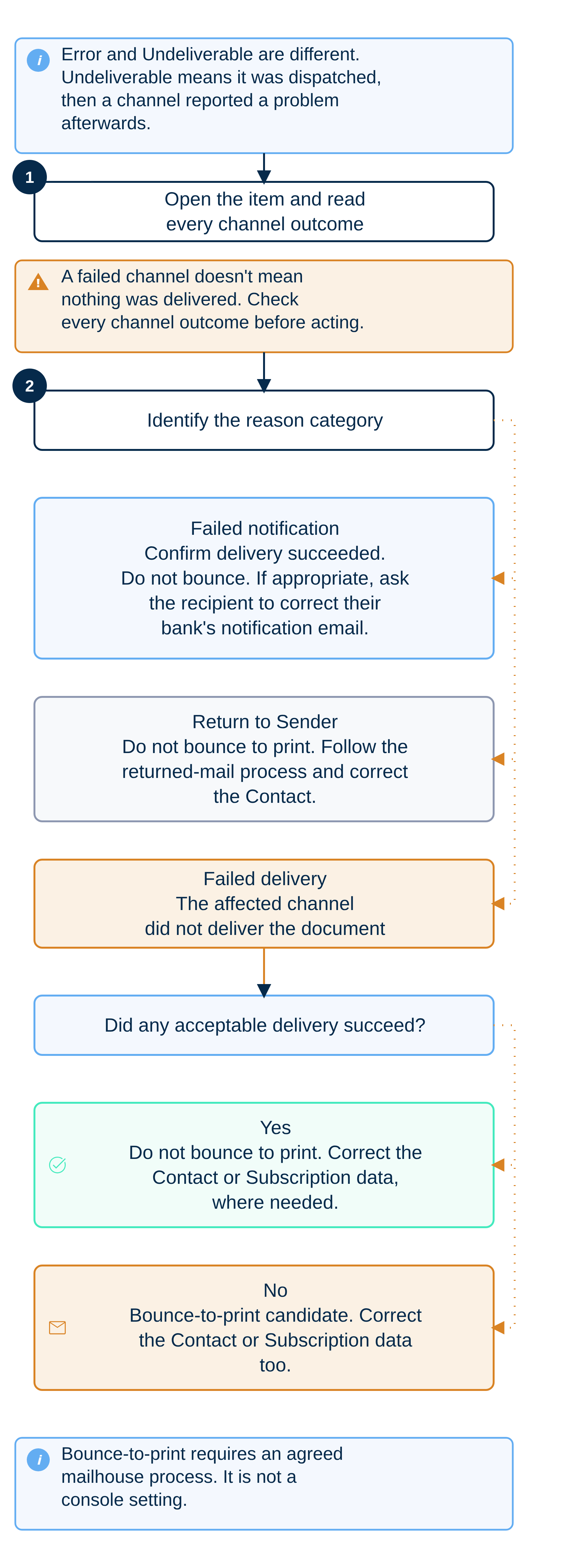
| Category | What happened | Usual action | Bounce-to-print? |
|---|---|---|---|
| Failed delivery | The affected channel did not deliver the document | Check all channel outcomes. Correct the Contact or Subscription where needed. Reprint only if no acceptable delivery succeeded. | Consider only when nothing else delivered successfully |
| Failed notification | The document was delivered, but an associated notification failed | Confirm the successful delivery and correct the notification address where appropriate | No |
| Return to Sender | The recipient says the document was delivered to the wrong person | Correct the Contact and follow the returned-mail process | No |
The principle that prevents most confusion
A document is flagged Undeliverable when any one digital delivery channel has a problem, even if the same document was delivered successfully through another channel.
Undeliverable is a review flag, not a statement that every delivery failed. Before you act on an item, check what did succeed as well as what failed. A document can be flagged Undeliverable because one accounting-system delivery failed while the same document reached the recipient through other channels.
For example, one API response recorded a failed Reckon delivery while the same document was delivered successfully through Payreq Mailbox, MYOB and email.
Error is a different thing
Error means the document never reached a deliverable state at all. Undeliverable means it was dispatched and at least one channel reported a problem afterwards. See Mail placed into Error status.
The three categories
Every reason code belongs to one of three categories. The category describes the failed channel event, not the overall outcome for the document.
1. Failed delivery
The channel did not deliver the document.
The most common case is a bounced email on the email channel:
- Permanent bounce: the address is invalid. The Subscription is deregistered automatically and the document is flagged Undeliverable.
- Transient bounce: a temporary failure. Payreq retries and flags the document Undeliverable after the fifth failed attempt. Depending on when the Mail was approved for sending, that fifth attempt can fall on the following day, so do not read a quiet first day as confirmation that everything was delivered.
A Payreq Mailbox delivery with an email copy is a special case. If the email copy bounces, the email channel records a failed delivery, but the document may still have been delivered to the Mailbox.
Handling: check what was delivered first. If there is no acceptable successful delivery, the document is a candidate for bounce-to-print.
2. Failed notification
The document was delivered, but a notification about it failed.
The clearest example is BPAY View. The scheme requires the recipient's bank to email them when a new bill arrives. If that bank email bounces, Payreq reports it as "The payer's financial institution was unable to email the payer." The bill is sitting in the recipient's online banking. Only the bank's notification failed.
Handling: normally no re-delivery is needed. Do not bounce these to print reflexively. Confirm the successful delivery before closing the item. You can prompt the recipient to correct the email address held by their bank.
3. Return to Sender
The recipient actively rejected the document.
A Payreq Mailbox user can use Return to Sender on a document they believe was delivered to them in error, most often a managing agent who no longer manages the property. The option is available until the due date of the most recently delivered document. Using it deregisters the Subscription, removes the document from the recipient's Inbox, and flags the item Undeliverable in your Mail tab. The reason code is not-owner-manager.
Handling: do not bounce these to print. The recipient has told you they are not the right party, so the postal address held against that record is likely wrong too. Where available, include these documents with your physically returned mail packs and correct the Contact record before the next run.
Reason codes
The API returns the code. The console generally shows a friendlier description. In the tables below, entries labelled Console reproduce wording confirmed in the supplied workbook or screenshots. Other entries explain the documented meaning without presenting it as an exact console message.
Some exact codes and console messages retain the historical technical term registration. In current Payreq Delivery language, this means a Subscription. The technical wording is retained where it helps match an API response or console message.
BPAY View
| Code | Console wording or documented meaning | Category |
|---|---|---|
invalid-expiry-date |
Expiry date for bill is invalid | Failed delivery |
invalid-creation-date |
Creation date for bill is invalid | Failed delivery |
invalid-payer-account |
Payer account is invalid | Failed delivery |
olb-failed-to-email-payer |
Console: "The payer's financial institution was unable to email the payer." | Failed notification |
olb-failed-to-deliver-billsummary |
The online bank could not present the bill to the payer | Failed delivery |
bpv-failed-to-deliver-billsummary-to-olb |
BPAY View could not forward the bill to the payer's online bank | Failed delivery |
| Code | Console wording or documented meaning | Category |
|---|---|---|
email/undeliverable |
Console: the Mail recipient shows "Payreq was unable to deliver the mail by Email". The Emails Sent Log identifies the attempt as "Bounce - Transient" or "Bounce - Permanent". | Failed delivery |
email/no-active-email-addresses |
Console: "There are no active email addresses for the active payer. Please review registration." | Failed delivery |
Payreq Mailbox and Payreq Group
| Code | Console wording or documented meaning | Category |
|---|---|---|
not-owner-manager |
Console: "Return to sender Not the owner or manager of the account." | Return to sender |
mybillsagent/undeliverable |
The document could not be delivered to the registered Payreq Mailbox | Failed delivery |
mybillsagent/no-active-registration |
Console: "Payreq was unable to deliver the mail by MyBills Agent, as there was no active registration." | Failed delivery |
Accounting integrations
| Code | Console wording or documented meaning | Category |
|---|---|---|
xeroconnect/undeliverable |
Console: "Payreq was unable to deliver the mail to Xero." | Failed delivery |
xeroconnect/no-active-registration |
Console: "Payreq was unable to deliver the mail to Xero, as there was no active registration" | Failed delivery |
myob/undeliverable |
The document could not be delivered to the payer's MYOB account | Failed delivery |
myob/no-active-registration |
The document could not be delivered because there was no longer an active registration | Failed delivery |
reckon/undeliverable |
The document could not be delivered to the payer's Reckon account | Failed delivery |
reckon/no-active-registration |
The document could not be delivered because there was no longer an active registration | Failed delivery |
eInvoicing
| Code | Console wording or documented meaning | Category |
|---|---|---|
einvoicing/undeliverable |
Could not deliver to the payer's eInvoicing account | Failed delivery |
einvoicing/duplicate-invoice-number |
Invoice number is the same as one previously sent. Correct it and resend with a new invoice number. | Failed delivery |
Archive
| Code | Console wording or documented meaning | Category |
|---|---|---|
archive/undeliverable |
The archived document could not be delivered to the registered Payreq Mailbox | Failed delivery |
archive/no-active-registration |
The archived document could not be delivered because there was no longer an active registration | Failed delivery |
Canada-only Payreq Mailbox codes
These codes remain in the active framework but apply only to the Canada-only mybills channel.
| Code | Documented meaning | Category |
|---|---|---|
mybills/undeliverable |
The document could not be delivered to the registered Payreq Mailbox | Failed delivery |
mybills/no-active-registration |
The document could not be delivered because there was no longer an active registration | Failed delivery |
Bounce-to-print
Bounce-to-print means a document that could not be delivered digitally is passed to your mailhouse to be printed and posted as a fallback.
It is an arrangement between you and your mailhouse rather than something you switch on in the console. Agree the following before you rely on it:
- which failed-delivery cases are in scope;
- how often undeliverable items are extracted and sent to the mailhouse;
- the cut-off relative to the due date, since a printed copy that arrives after the due date has limited value; and
- who confirms the item was printed and lodged.
Deciding whether to bounce an item to print
- Open the Mail item and read every delivery outcome, successful and failed.
- If any channel delivered the document acceptably, do not bounce it to print.
- If the failure is a failed notification, do not bounce it to print. The document was delivered.
- If the failure is a Return to Sender, do not bounce it to print. Correct the Contact instead.
- If the failure is a failed delivery and nothing else succeeded, the item is a bounce-to-print candidate. Fix the underlying Contact or Subscription data as well, or the same recipient fails again next run.
Retrieving undeliverable documents
Undeliverable documents can be retrieved by their dispatch date or by their return date, whichever suits the process. If you integrate through the API, both are available as separate retrieval calls, including an option to list every bounced email in a window rather than one per document. See Payreq API.
Watch for patterns
Undeliverables repeat. After each run, look for repeated name mismatches from one source system, Subscriptions expiring after property sales, and receiver-managed properties no longer linked to a group Mailbox. Correcting the upstream data reduces repeated failures and avoidable reprinting.
Related articles
Was this article helpful?
That’s Great!
Thank you for your feedback
Sorry! We couldn't be helpful
Thank you for your feedback
Feedback sent
We appreciate your effort and will try to fix the article