A Mail item shows an Error status when it never reached a deliverable state at all, as distinct from Undeliverable, which means it was dispatched and a delivery channel reported a problem afterwards. See Understanding Mail statuses for how Error fits alongside the other statuses.
This is different from a Job showing an Error status, where file processing failed or stopped. See Understanding Job Statuses and Errors for that scenario. This article covers Error at the individual Mail item level.
Known causes
| Cause | What happened | What to do |
|---|---|---|
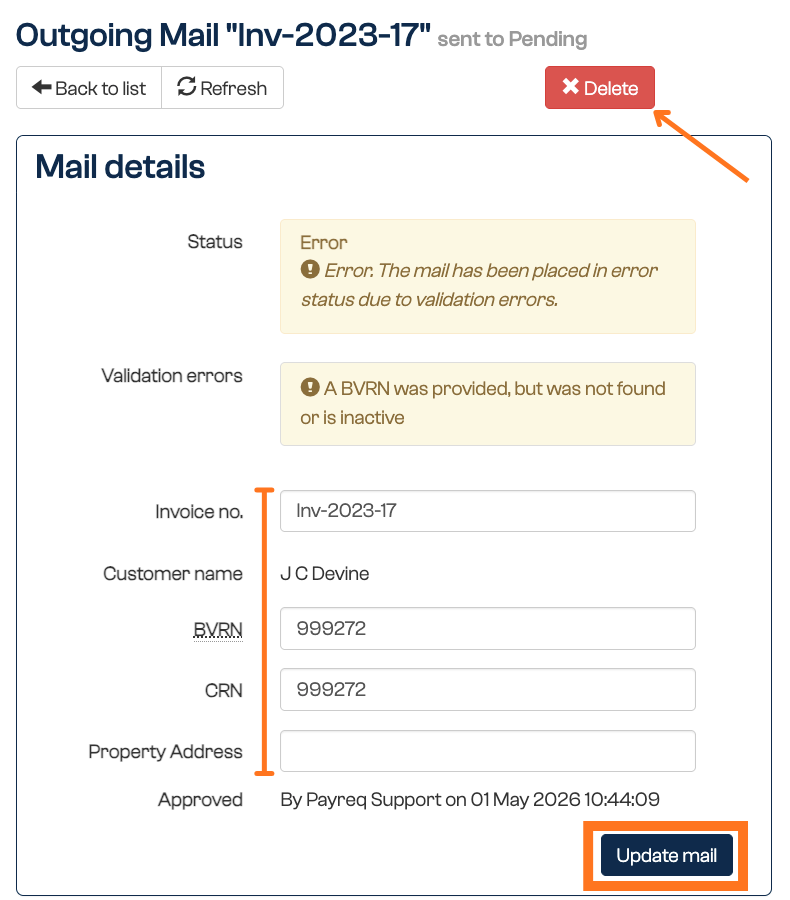
| BVRN Inactive | By far the most common cause. The Mail item was uploaded and held as Awaiting Review while the customer had an active Subscription, but the Subscription was cancelled before the item was approved and sent. The console shows: A BVRN was provided, but was not found or is inactive. |
This is expected behaviour, not a fault. Check the customer's current registration status, and re-route the document (for example, print and post) if it still needs to reach them. |
| Image not found | A record in the uploaded file had no matching PDF in the package, either a filename mismatch or a genuinely missing file. The console shows Image file for mail was not found. or No attachment found for invoice. |
Fix the package so the filename matches exactly, then reload. If the filenames look correct, check your account's document-naming settings before assuming the file itself is at fault. |
Recognising Image not found in an acknowledgment file. If you load documents over SFTP, this error appears in the acknowledgment file as a
FAILstatus against the affected record, with a validation error naming the document identifier and reporting that the document was not found. That is the same fault seen from the file side rather than the console side.
Reviewing Error items
- Go to the Mail tab.
- Filter by Status > Error.
- Open an item to see its details and confirm which of the causes above applies.
Fixing an individual Mail item
Mail in Error status can be reviewed and resolved one item at a time:
- If a field validation mismatch is identified, you can update that field directly on the item and save the change.
- Alternatively, if the item doesn't need to be corrected and resent, you can delete it.
When an entire Job is in Error
Sometimes the whole Job is affected rather than individual items within it, see Understanding Job Statuses and Errors for that scenario. In that case:
- You or your mailhouse will need to resubmit or reupload a new Job, since correcting individual items isn't practical at that scale.
- To have the old, errored documents removed rather than left sitting in Error status, submit a ticket to Payreq Support requesting that all documents from the affected Job be deleted in batch.
Get notified
If you'd rather not check the Mail tab manually, the A mail could not be sent due to being in error notification tells a user when this happens. See User Notifications to turn it on.
Related articles
Was this article helpful?
That’s Great!
Thank you for your feedback
Sorry! We couldn't be helpful
Thank you for your feedback
Feedback sent
We appreciate your effort and will try to fix the article