When you select a specific document in the Mail tab, the Mail details pane shows the key information Payreq holds for that document. This includes the details used to identify the customer, match the document to a Subscription, show document information to the recipient, support payment and reminder features, and track how the document was processed through Payreq Delivery.
What are Mail details?
Mail details are the document metadata associated with an uploaded bill, notice, invoice, or other Mail item. They may include:
- who the document belongs to
- the customer or account details used for delivery
- bill-specific information such as due dates, balances, and payment amounts
- the current delivery status
- when the document was uploaded, approved, sent, or actioned
- a preview of the document PDF
The exact fields shown vary depending on the document type, your configuration, and the information supplied in the upload file.
Types of Mail details
Mail details generally fall into three groups.
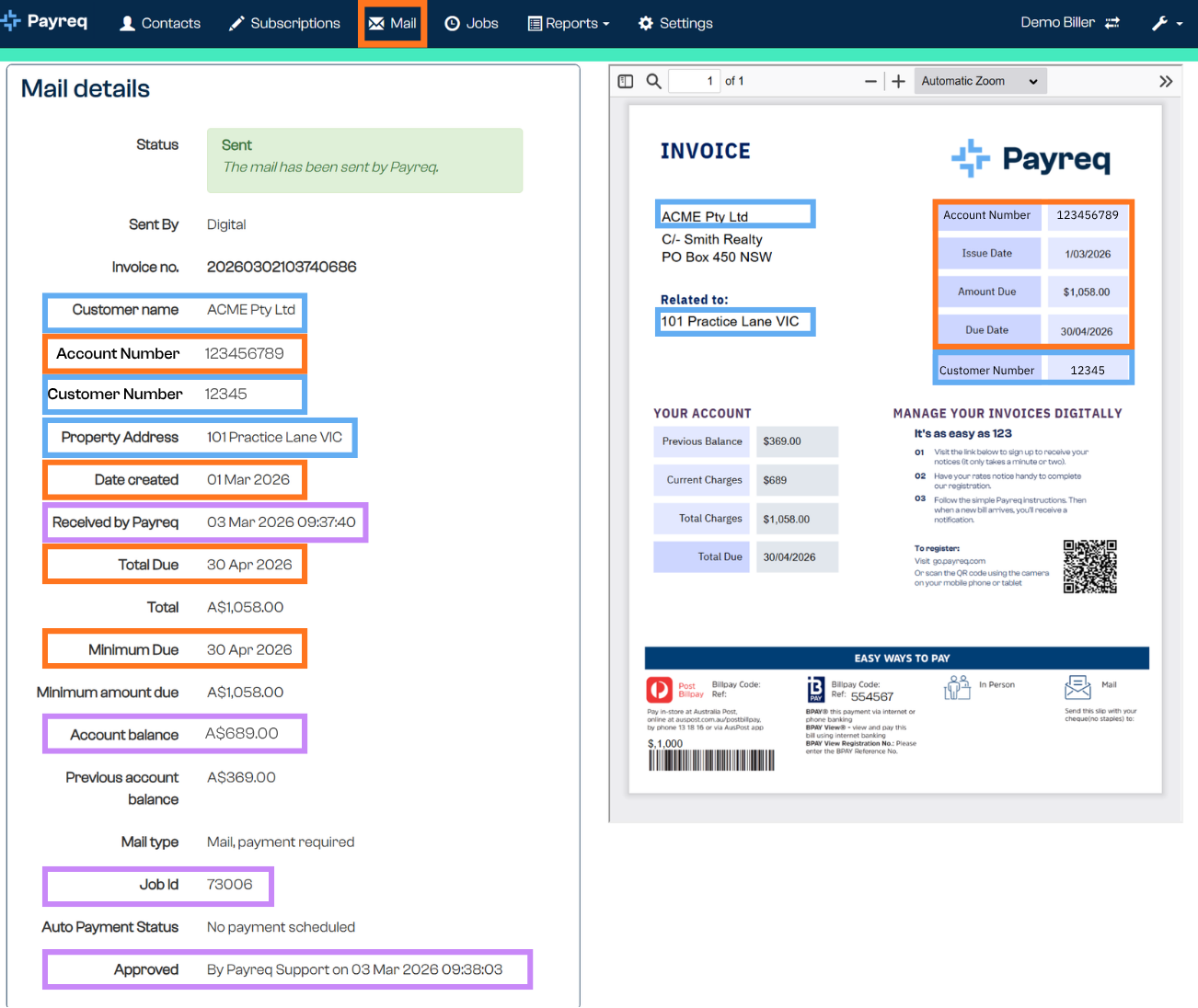
1. Mandatory record information (orange)
Mandatory record information identifies the document and matches it to the correct customer or Subscription. The mandatory fields are:
- Contact ID
- Date Created
- Due Date
- Amount Due
2. Additional document and payment information (blue)
Additional information includes bill-specific fields and other details supplied with the document. These help recipients understand the document, and can support payment, reminder, and customer service processes.
| Field | Description |
|---|---|
| Account number / customer number | Additional identifiers displayed against the document. These may match fields printed on the PDF. |
| Property address / related address | The property, service, or account address associated with the document. |
| Total due | The total amount due for the document. |
| Due date | The date payment is due. This may be used for reminders or payment scheduling. |
| Minimum amount due | The minimum amount payable, where applicable. |
| Account balance | The current account balance shown for the document. |
| Previous account balance | The previous or opening balance carried into the document. |
| Mail type | The type of Mail item, such as a bill, notice, invoice, or payment-required document. |
| Auto Payment Status | Whether an automatic payment is scheduled or associated with the document. |
Some of these details may be shown to the recipient in their Payreq Mailbox. They may also be used to pre-fill payment instructions or support reminder notifications.
3. Processing and delivery information (purple)
Processing information shows how the document has moved through Payreq Delivery, so you can confirm whether it has been uploaded, reviewed, approved, sent, archived, or externally actioned.
| Field | Description |
|---|---|
| Status | The current document status, such as Awaiting Review, Sent, Undeliverable, Undeliverable Actioned, or Archived. |
| Sent by | The delivery method or channel used for the document. |
| Date created | The document date or creation date supplied in the upload file. |
| Received by Payreq | The date and time Payreq received the document. |
| Job ID | The upload job the document belongs to. Useful when reviewing a batch of uploaded Mail. |
| Approved | Who approved the document for sending, and when, where review before sending is enabled. |
| Mail recipients | Recipient and delivery channel information, where available. |
| Mail view log | Whether the document has been viewed, where applicable. |
| Email sent log | Email delivery information, including sent, delivered, and opened events where available. |
| External action | Whether an undeliverable document has been handled outside Payreq, such as being printed and mailed manually. |
Was this article helpful?
That’s Great!
Thank you for your feedback
Sorry! We couldn't be helpful
Thank you for your feedback
Feedback sent
We appreciate your effort and will try to fix the article