Contact Field Settings determine how your Contact data is structured in Payreq Delivery, and which values are used to identify and authenticate a customer when they subscribe for digital delivery.
Every Payreq Delivery account has two mandatory fields:
- Contact ID
- Customer name
In addition to these, Payreq Delivery supports up to eight configurable Contact Fields. These let each Mailer define the extra customer or account information stored against a Contact.
What Contact Field Settings control
Each Contact Field can be given a label and, where required, a special purpose. A Contact Field may be used as:
- an ID field, to uniquely identify the Contact
- an Authorisation (Auth) field, which the customer must provide when subscribing for digital delivery
- an optional supporting field, such as a Notice ID or Group Account Number
Example
This example uses the first three Contact Fields.
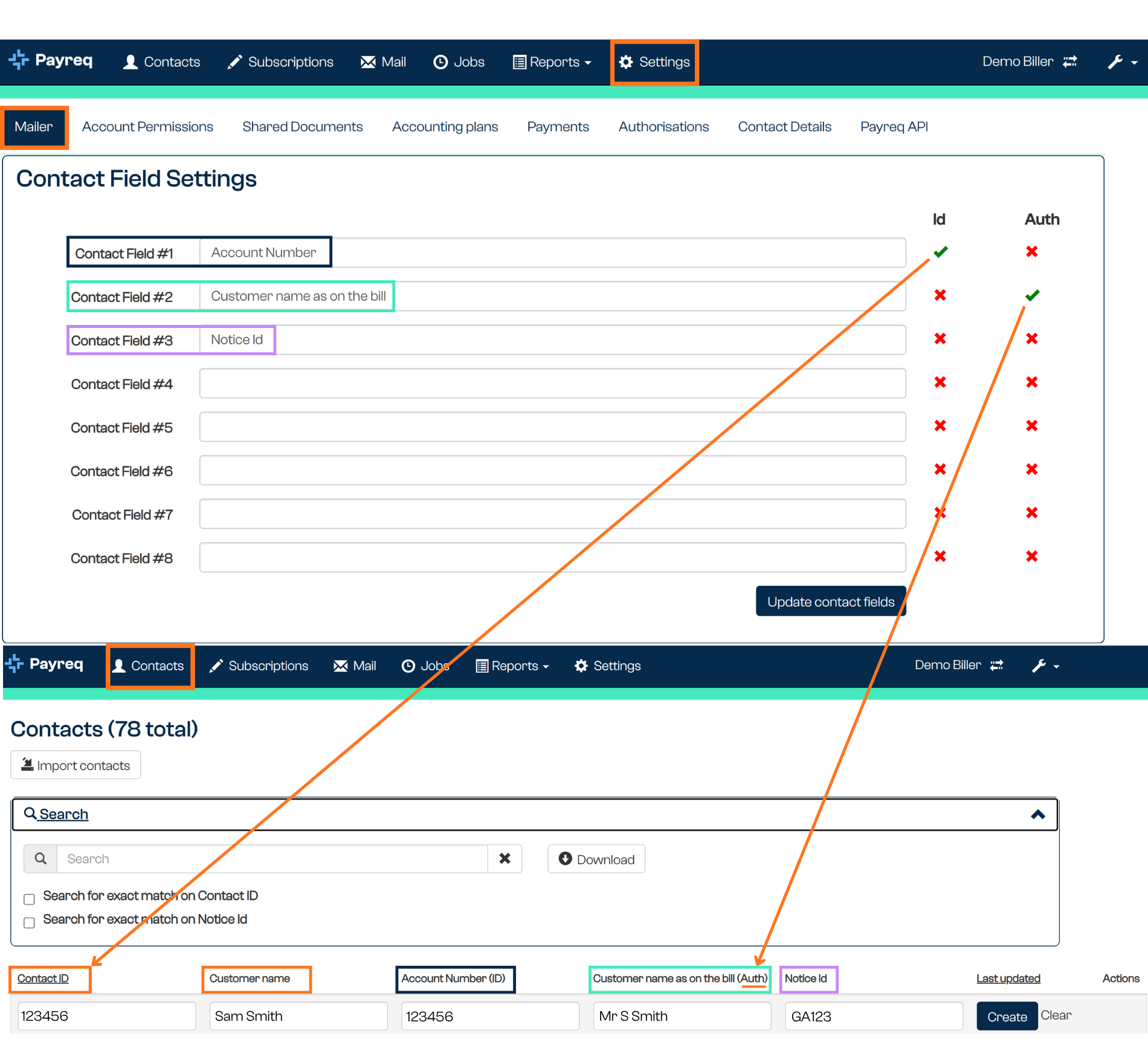
Contact Field #1, Account Number. Here, Contact Field #1 is labelled Account Number and configured as the ID field, so the account number is the primary identifier for the Contact. Because it's the ID field, the same value must be provided in both the Contact ID and Contact Field #1. For example, Contact ID = 123456 and Contact Field #1 (Account Number) = 123456. This ensures the Contact is correctly identified and matched.
Contact Field #2, Customer name as on the bill. Here, Contact Field #2 is configured as the Authorisation (Auth) field, so customers must enter this value when subscribing. Payreq verifies that the details entered match the correct Contact. This field is often similar to the mandatory Customer name field, but doesn't have to be identical. For example, Customer name may be recorded as Sam Smith, while Customer name as on the bill may be printed as Mr S Smith. This lets Payreq store both a general customer name for display and management, and the exact name format printed on the bill for subscription authentication.
Contact Field #3, Notice ID. Here, Contact Field #3 is optional. Where a value is provided, it can support additional purposes such as Mailer-managed Subscriptions linked to an authorised agent.
Why this matters
Correct Contact Field configuration is important because it affects how Contacts are created and updated, how customers subscribe for digital delivery, how Payreq authenticates subscription requests, and how Mailer-managed Subscriptions are maintained. If the wrong values are supplied, customers may be unable to subscribe successfully, or records may not behave as expected.
Key points
- Contact ID and Customer name are always mandatory.
- Each Contact ID must be unique within your Contacts list, and each Contacts update must include each Contact ID only once. See Managing Contacts in Payreq Delivery.
- Up to eight Contact Fields can be configured.
- A field marked as ID is a key identifier for the Contact.
- A field marked as Auth must be entered by the customer when subscribing.
- Optional fields such as Notice ID can support additional workflows, including Mailer-managed Subscriptions.
Was this article helpful?
That’s Great!
Thank you for your feedback
Sorry! We couldn't be helpful
Thank you for your feedback
Feedback sent
We appreciate your effort and will try to fix the article