Mailer options control how your account handles registration validation, delivery approval, subscription dependency, and some display behaviours. They're usually set during onboarding and reviewed from time to time as your processes settle. Access is generally restricted to users with the Mailer Settings Administrator permission.
Some of these options can hold Mail, block uploads, or change how Subscriptions behave. On a live account, confirm the operational impact before you enable or disable any of them.
(In these option names, "registration" means the same as Subscription.)
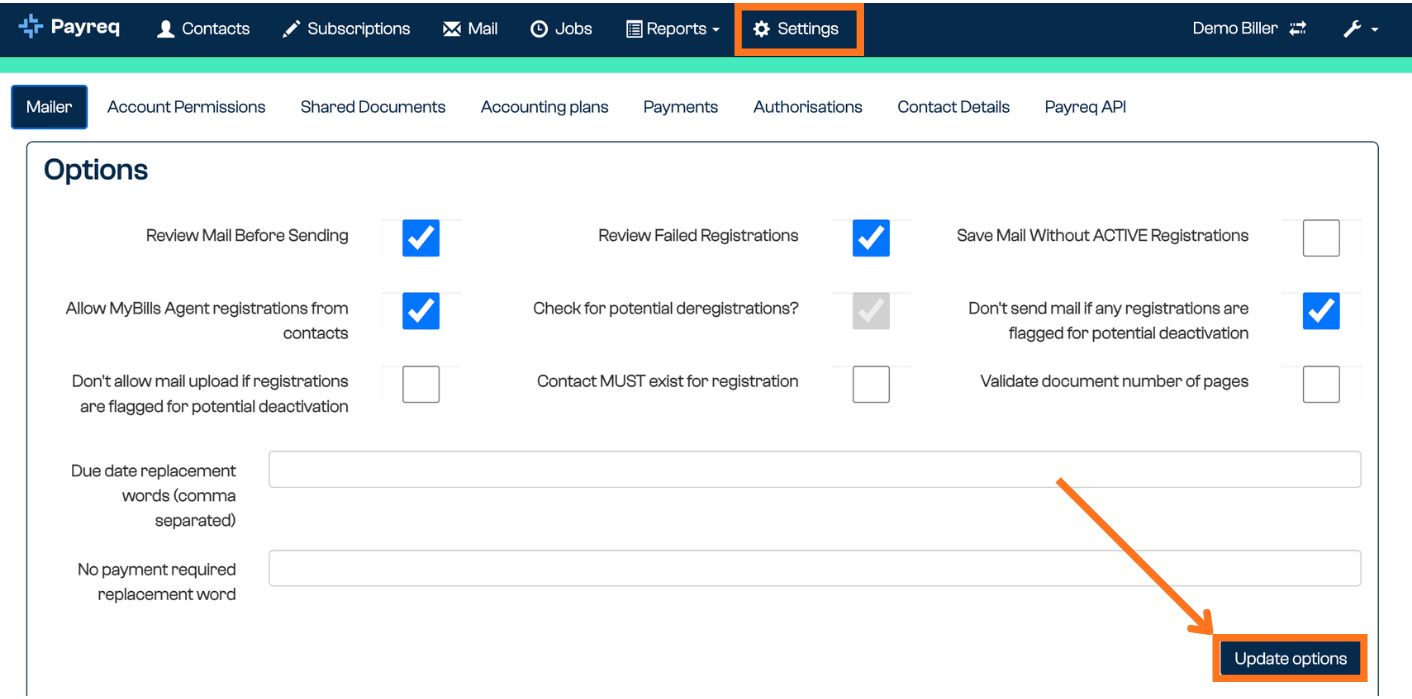
The options
| Option | What it does | When to use it |
|---|---|---|
| Review Mail Before Sending | Holds all Mail as Awaiting Review for manual approval before it's sent. | During onboarding or testing, or when you want an approval checkpoint. Often turned off once your process is stable. |
| Review Failed Registrations | Holds failed registrations as Pending Failed for review, instead of failing them automatically. | When you use authentication fields, or want to check failures manually before they're finalised. |
| Save Mail Without Active Registrations | Saves documents for Contacts that don't yet have an active Subscription as Pending Subscription. | When digital delivery is expected or required, and Mail should be held until the customer registers. |
| Check subscription name matches employee name | Checks that the activated Subscription name matches the employee name in Contacts. | Mainly for payroll or employee use cases where name matching is part of validation. |
| Check for potential deregistrations | Flags Subscriptions for review when an account identifier looks reused, for example when a property or account changes hands. | Where account reuse is common and an existing Subscription may no longer belong to the same person. |
| Don't send Mail if any registrations are flagged for potential deactivation | Prevents Mail being sent while affected Subscriptions are flagged for review. | When Mail must not go out until possible ownership or identity changes are reviewed. |
| Don't allow Mail upload if registrations are flagged for potential deactivation | Prevents document upload while affected Subscriptions are flagged. | When you'd rather stop documents entering the Mail flow until the flagged Subscriptions are resolved. |
| Contact must exist for registration | Requires a matching Contact record before a Subscription can be accepted. | When Subscriptions should only be allowed for known Contacts. |
| Allow MyBills Agent registrations from Contacts | Lets agent (Group) Subscriptions be driven from your Contact data, using the group identifier on the Contact. | For accounts that actively use agent (Group) Subscriptions and want them maintained from Contacts. See Agent Authorisations. |
Display wording options
Two text settings appear below the options. They control wording shown to customers in place of a value:
- Due Date Replacement Words: text shown in place of a due date when no due date applies, for example "Payable on receipt".
- No Payment Required Replacement Word: text shown in place of a payment amount when no payment is due, for example "No Payment Required".
Because these affect customer-facing wording, confirm how they appear on a test document before relying on them, especially where billing or payment language matters.
Was this article helpful?
That’s Great!
Thank you for your feedback
Sorry! We couldn't be helpful
Thank you for your feedback
Feedback sent
We appreciate your effort and will try to fix the article