Before your customers can pay bills through Payreq, your account needs an active payment gateway. You set the gateway up in the console, and Payreq Support activates it. This article covers setting up a gateway, updating its credentials, and deactivating it.
Setting up a payment gateway
- Log in to Payreq Delivery.
- Go to Settings > Payments.
- Select the setup link.
- Select a payment gateway provider from the supported list.
- Enter the credentials for your gateway.
- Configure the card types you accept and any surcharge percentages.
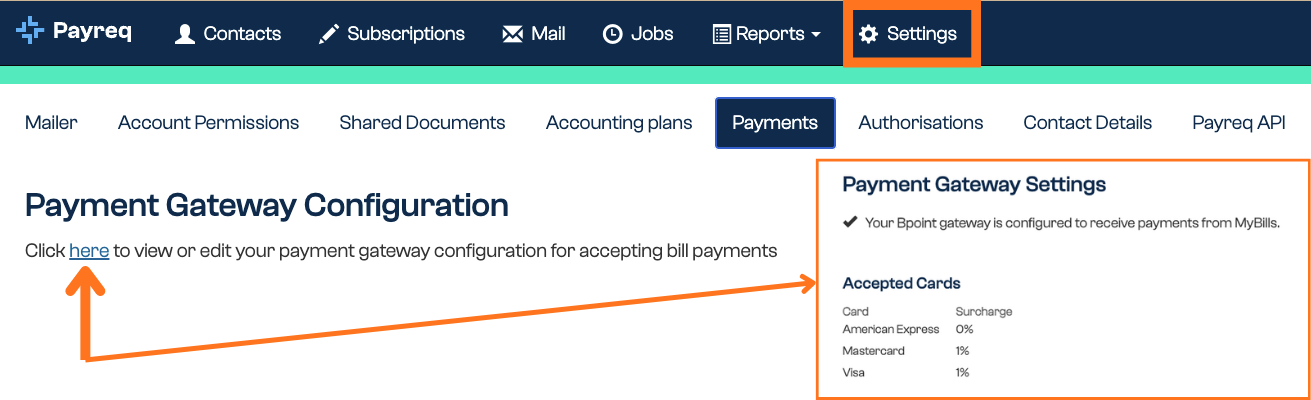
A gateway you've set up is not live until Payreq Support activates it. Once you've entered your details, submit a ticket so Support can complete activation and run a test payment.
Make sure your organisation's contact details are populated in your account. These are shown to a customer if a payment fails, so they know who to contact.
Updating gateway credentials
There's no edit-in-place option for gateway credentials. Updating them means removing the existing gateway and setting it up again, so plan the change carefully:
- While the gateway is removed, customers can't make payments, so keep the gap as short as possible and be ready to reinstate the credentials straight away.
- Don't do this during a bill load or while auto payments are being processed, as payments could fail.
- Test the new setup, including a successful test payment, before relying on it.
- Coordinate the change with Payreq Support, since the gateway has to be activated again afterwards.
Deactivating a gateway
Deactivating a gateway is a Payreq Support action. When a gateway is deactivated, Support removes it, cancels the auto payment plans that depend on it, and the affected customers are emailed. If you need a gateway deactivated, submit a ticket.
What you can do, and what needs Payreq Support
| Task | Who does it |
|---|---|
| Enter gateway details, accepted cards, and surcharges | You, in Settings > Payments |
| Activate a gateway | Payreq Support |
| Update gateway credentials | You remove and re-enter the details; Payreq Support reactivates |
| Deactivate a gateway | Payreq Support |
Related articles
Was this article helpful?
That’s Great!
Thank you for your feedback
Sorry! We couldn't be helpful
Thank you for your feedback
Feedback sent
We appreciate your effort and will try to fix the article