Deregistering a Subscription cancels a customer's digital delivery for that channel. Once a Subscription is deregistered, documents are no longer sent to it, and paper delivery resumes for the account unless it still has other active digital Subscriptions.
Deregistering is different from the Deregister? status. Deregister? is a review flag raised when a name change is detected, and reviewing it may result in keeping the Subscription or deregistering it. See Managing "Deregister?" Subscriptions. This article covers the actual process of deregistering a Subscription.
When a Subscription is deregistered
A Subscription can be deregistered when:
- The customer asks to stop digital delivery and return to paper.
- A property changes hands, or the account no longer requires delivery.
- You review a Subscription flagged Deregister? and decide it should be cancelled.
Customers can also unsubscribe themselves, which deregisters their Subscription.
Deregistering a single Subscription
- Go to the Subscriptions page in your Payreq Delivery account.
- Select the Subscription to open the record.
- Choose a deregistration reasonfrom the dropdown, for example:
- Cancelled by customer, paper mail will recommence
- Cancelled by mailer, due to ownership transfer
- Cancelled by mailer, due to subdivision
- Cancelled by mailer, no new delivery required
- Other reasons defined by your organisation
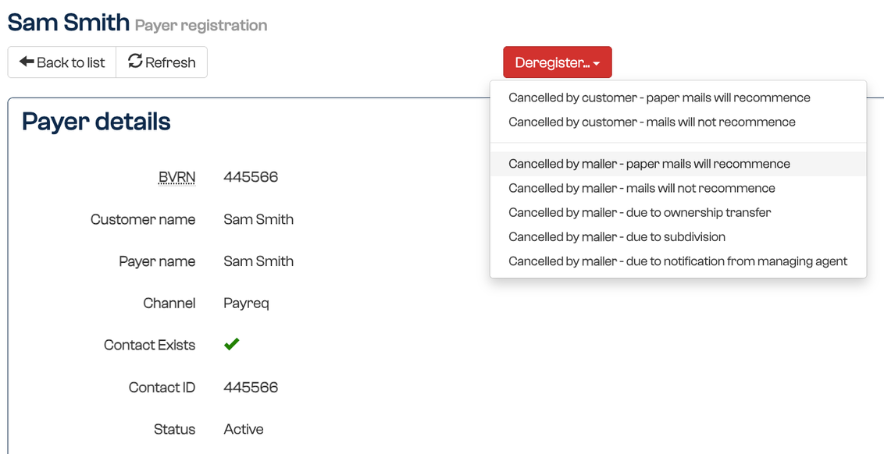
- Save your changes to finalise the deregistration. The Subscription moves to the Deregistered state.
Deregistering in bulk
You can deregister the Subscriptions for many Contacts at once using Import deregistrations at the top of the Subscriptions page.
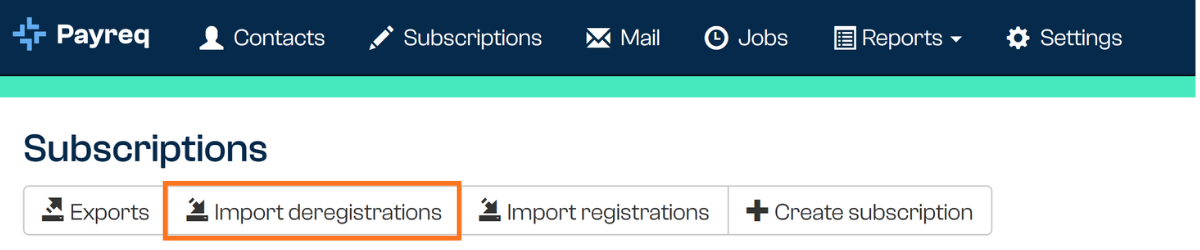
Selecting it opens a window where you upload a CSV file containing a single column of Contact IDs, with no other columns.
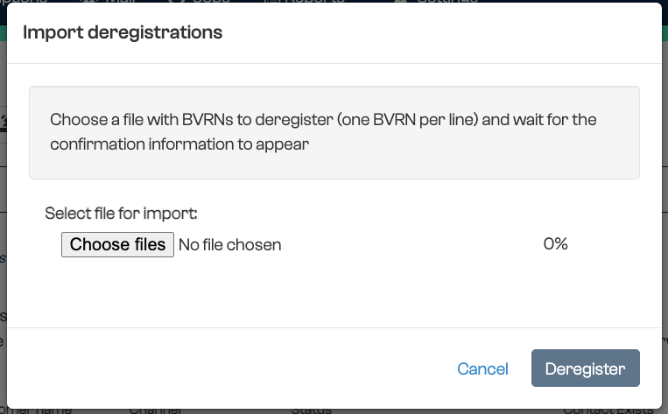
Once you confirm, every Subscription associated with any of those Contact IDs is deregistered.
Important: all Subscriptions for a listed Contact ID are deregistered, not just one. If an account has more than one Subscription, for example two subscribed owners of a property, or the same customer subscribed through more than one channel, all of them are deregistered together. Before you confirm, Payreq shows a verified count that identifies any Contact IDs with more than one Subscription, so you can check the impact first.
What happens after deregistration
Once a Subscription is deregistered, digital delivery to that channel stops and the status shows as Deregistered. Paper delivery resumes for the account unless it has other active digital Subscriptions.
Was this article helpful?
That’s Great!
Thank you for your feedback
Sorry! We couldn't be helpful
Thank you for your feedback
Feedback sent
We appreciate your effort and will try to fix the article