Many Payreq Delivery customers work with a mailhouse or print service provider to prepare, print, lodge and upload their notices. The operational detail varies between sender and mailhouse, but the shape of the run is the same each time.
TABLE OF CONTENTS
- The recommended process
- Step 1: Update Contacts
- Step 2: Allow processing time and retrieve the Active Subscriptions list
- Step 3: Split the run
- Step 4: Upload the digital population as a Standard load
- Step 5: Upload the print population as a Historical load
- Step 6: Review the processing results
- Step 7: Review and approve
- Step 8: Lodge the printed notices
- Why two loads rather than one Archive load
- Timing matters
- Agree these before each run
- Related articles
This article describes the recommended process for an archive-type service, where a single bill run produces both digitally delivered and printed notices. Confirm the specifics with Payreq and your mailhouse before your first run.
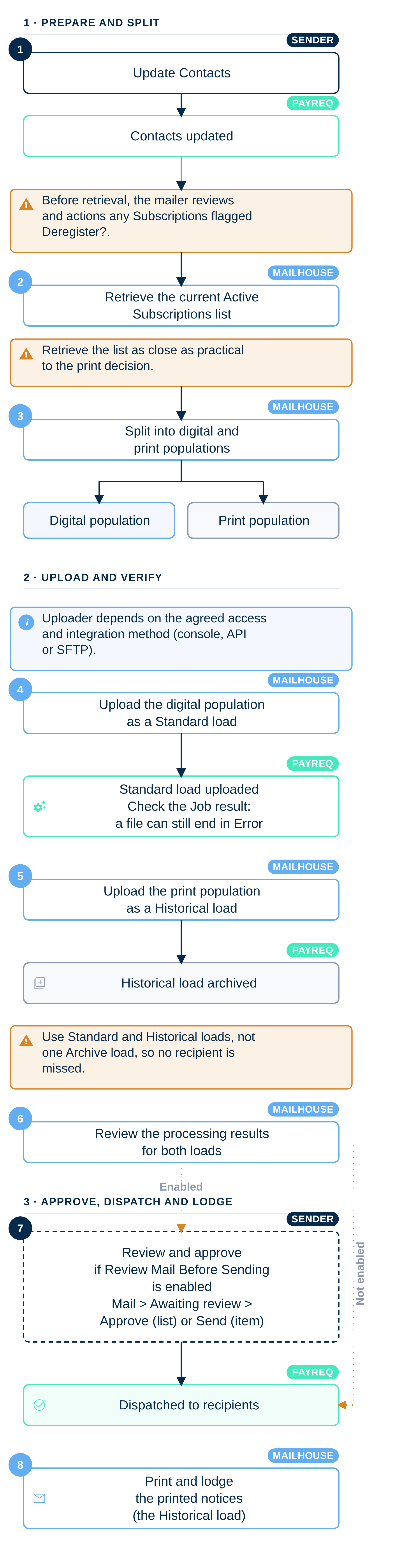
The recommended process
- Update Contacts and action any Subscriptions flagged Deregister?.
- Allow 5–10 minutes after the Contact update finishes, then retrieve the current Active Subscriptions list.
- Split the bill run into a digital population and a print population.
- Upload the digital population as a Standard load.
- Upload the print population as a Historical load.
- Review the processing results for both loads.
- Review and approve the digital notices for send.
- Print and lodge the printed notices.
Step 1: Update Contacts
Update the Contact records in Payreq before the notices are sent, so Payreq holds the current customer and delivery information for the run. Contacts are usually updated as part of each bill run, and some senders also update them between runs.
See Updating Contacts via SFTP, Updating Contacts via API or Updating Contacts in the Payreq console, depending on how you integrate.
Contact updates can change Subscriptions, including receiver-managed Subscriptions driven from your Contact data. After the Contact update, check the Deregister? view. The mailer reviews and actions any flagged Subscriptions before the mailhouse retrieves the current Active Subscriptions list for the split. A flagged Subscription may be kept active or deregistered, depending on whether the Contact change still applies to that recipient. See How Contact changes affect Subscriptions and Managing "Deregister?" Subscriptions.
Step 2: Allow processing time and retrieve the Active Subscriptions list
A completed Contacts Job confirms that Payreq has finished processing the Contacts file. It does not report when every downstream Contact-driven Subscription change has finished being applied. Payreq does not currently provide a separate completion indicator for that work.
Allow 5–10 minutes from the Contacts Job finishing before retrieving Active Subscriptions. This is an operational allowance, not a guarantee that every downstream change has completed.
The mailhouse retrieves the current list of Active Subscriptions. This list identifies which customers are registered for digital delivery and, by exclusion, which notices still need to be printed and lodged.
Retrieve it as close as practical to the print decision. Customers can subscribe or unsubscribe at any time, and a list retrieved days early will not reflect the position at the moment of the split.
Retrieve the list from the console using the export or download options in Downloading Subscriptions, or through the API, see Payreq API.
The API returns the complete current registration snapshot in one response and does not use a page parameter. It refuses the request while agent registrations are pending because the snapshot would be incomplete. If that happens, wait for the pending registration work to finish and retrieve the complete snapshot again. Do not split the bill run from a partial list.
Step 3: Split the run
Compare the notice data against the Active Subscriptions list:
| Recipient | Outcome |
|---|---|
| Has an active digital Subscription | Prepared for digital delivery through Payreq |
| Has no active digital Subscription | Printed and lodged by the mailhouse |
This produces two populations: digital records to be delivered through Payreq, and print records to be printed and retained in Payreq as historical records.
Step 4: Upload the digital population as a Standard load
Upload the digital records as a Standard bill load. A Standard load is for current documents that are expected to be delivered digitally, so it should contain only the recipients identified in step 3 as having an active Subscription.
Review the Standard Job result for any record Payreq did not deliver and follow the print-fallback process agreed for the run. Do not assume that an unsuccessful digital record has been printed or archived.
Step 5: Upload the print population as a Historical load
Upload the print records as a Historical bill load. A Historical load archives every document in the file, so it retains a Payreq record of the notices printed and lodged outside Payreq. It contains the print population only.
Do not include a record in the Historical load if it was also submitted in the Standard load, unless Payreq has specifically agreed to it.
For what each load type does, see Bill load types: Standard, Archive and Historical.
Step 6: Review the processing results
Once the files are uploaded, Payreq processes each load. Depending on the agreed integration method, the mailhouse may also need to trigger job processing through the Payreq API.
The current external API contract documents this trigger for BILL_LOAD jobs. It also accepts an optional mailhouse-id only where that identifier has been configured for the biller. Do not use the API job endpoint to infer a payroll workflow.
Review both loads:
- Standard load: work through any processing problem and any record Payreq did not deliver. See Understanding Job Statuses and Errors for file-level failures and Mail placed into Error status for individual records that appear in Error.
- Historical load: confirm the printed records have been retained.
Step 7: Review and approve
The sender reviews the Standard load in Payreq and approves the notices for send. Where Review Mail Before Sending is enabled, the list is under Mail, filtered to Awaiting review. Use Approve for selected list items or Send from an individual item's detail. Once approved, the notices are dispatched through each recipient's digital channel.
The Historical load is not dispatched. It is retained in Payreq for archive or historical reference.
Step 8: Lodge the printed notices
The mailhouse prints and lodges the notices without a digital Subscription, usually with Australia Post. Those notices also appear in Payreq as historical records if they were uploaded in step 5.
Why two loads rather than one Archive load
An Archive load asks Payreq to decide at processing time whether each notice is delivered digitally or archived. If a recipient is treated as digitally subscribed at that moment but has in fact unsubscribed since the print decision, no printed copy was produced for that run and the recipient can miss the notice entirely.
Splitting the populations before upload removes that risk. The digital population is submitted as Standard and the printed population as Historical, so the intended treatment of every record is fixed before the file reaches Payreq.
Timing matters
Subscription data changes during a bill run. A customer can unsubscribe after the mailhouse has retrieved the Active Subscriptions list but before the notices are approved in Payreq. Two habits reduce the risk:
- retrieve the Active Subscriptions list as close as practical to the print decision; and
- allow 5–10 minutes between the Contacts Job finishing and retrieving the list; and
- upload the full notice population, digital and print, so Payreq holds a complete record of the run.
Agree these before each run
The exact process varies with the sender, the mailhouse, the file format and the integration method. Before each bill run, confirm between the parties:
- who updates Contacts;
- who checks and actions any Subscriptions flagged Deregister? after the Contact update;
- who monitors the 5–10 minute allowance after the Contacts Job finishes;
- when the Active Subscriptions list will be retrieved;
- how the digital and print populations will be separated;
- who uploads the Standard load;
- who uploads the Historical load;
- who reviews the processing results;
- who approves the digital notices in Payreq; and
- how failed or unmatched Standard records will be handled.
Two file-level habits are worth adding to that list:
- each bill load uses a unique File ID; and
- where possible, the Standard and Historical loads for one run share a Campaign Name or Campaign Internal Reference, so they can be identified as parts of the same run.
Related articles
Was this article helpful?
That’s Great!
Thank you for your feedback
Sorry! We couldn't be helpful
Thank you for your feedback
Feedback sent
We appreciate your effort and will try to fix the article